
1. 개요
어떤 프레임워크 든 프레임워크 없이 구현을 해보면 왜 이게 편한건지, 왜 쓰는지를 이해할 수 있다. node 와 express, nest 로 단순 controller 기능을 구성했을 때 어떤 차이가 있는지 비교해보고자 한다.
2. 본론
2.1. node 로 구성
node 내장 패키지로 http 패키지가 존재한다.
해당 패키지를 import 하여 req, res 구성하고 한다. 만약 다양한 엔드포인트로 접근토록 하려면 다음과 같이 if - else 로 분기처리 하여 path 별 응답 코드를 작성해야 한다.
// import http from 'http';
const http = require('http');
const url = require('url');

const host = 'localhost';
const port = 3000;

// req -> request 요청
// res -> response 응답
const server = http.createServer((req, res) => {

    const path = url.parse(req.url).pathname;

    // uri 별 분기 처리
    if (path === '/') {
        res.writeHead(200, { 'Content-Type': 'text/html' });
        res.end('<h1>Home!</h1>');
    } else if (path === '/about') {
        res.writeHead(200, { 'Content-Type': 'text/html' });
        res.end('<h1>About!</h1>');
    } else if (path === '/contact') {
        res.writeHead(200, { 'Content-Type': 'text/html' });
        res.end('<h1>Contact!</h1>');
    } else {
        res.writeHead(404, { 'Content-Type': 'text/html' });
        res.end('<h1>Page Not Found</h1>');
    }
});

server.listen(port, host, () => {
    console.log(`Server is running on <http://$>{host}:${port}`);
});
이런식으로 http 패키지를 사용하게 되면 path 분기 처리 로직이 길어지고, 오디오 파일이라던지 param 파싱 등 과 같은 좀 더 섬세한 작업이 어려워진다.
그렇기 때문에 Express 를 사용한다!
2.2. express 로 구성
const express = require('express');

const app = express();

app.get('/', (req, res) => {
    res.send('<h1>Home!</h1>');
});

app.get('/post', (req, res) => {
    res.send('<h1>Post!</h1>');
});

app.use((req, res) => {
    res.status(404).send('<h1>Page Not Found</h1>');
})

app.listen(3000, () => {
    console.log('Server is running on <http://localhost:3000>');
})
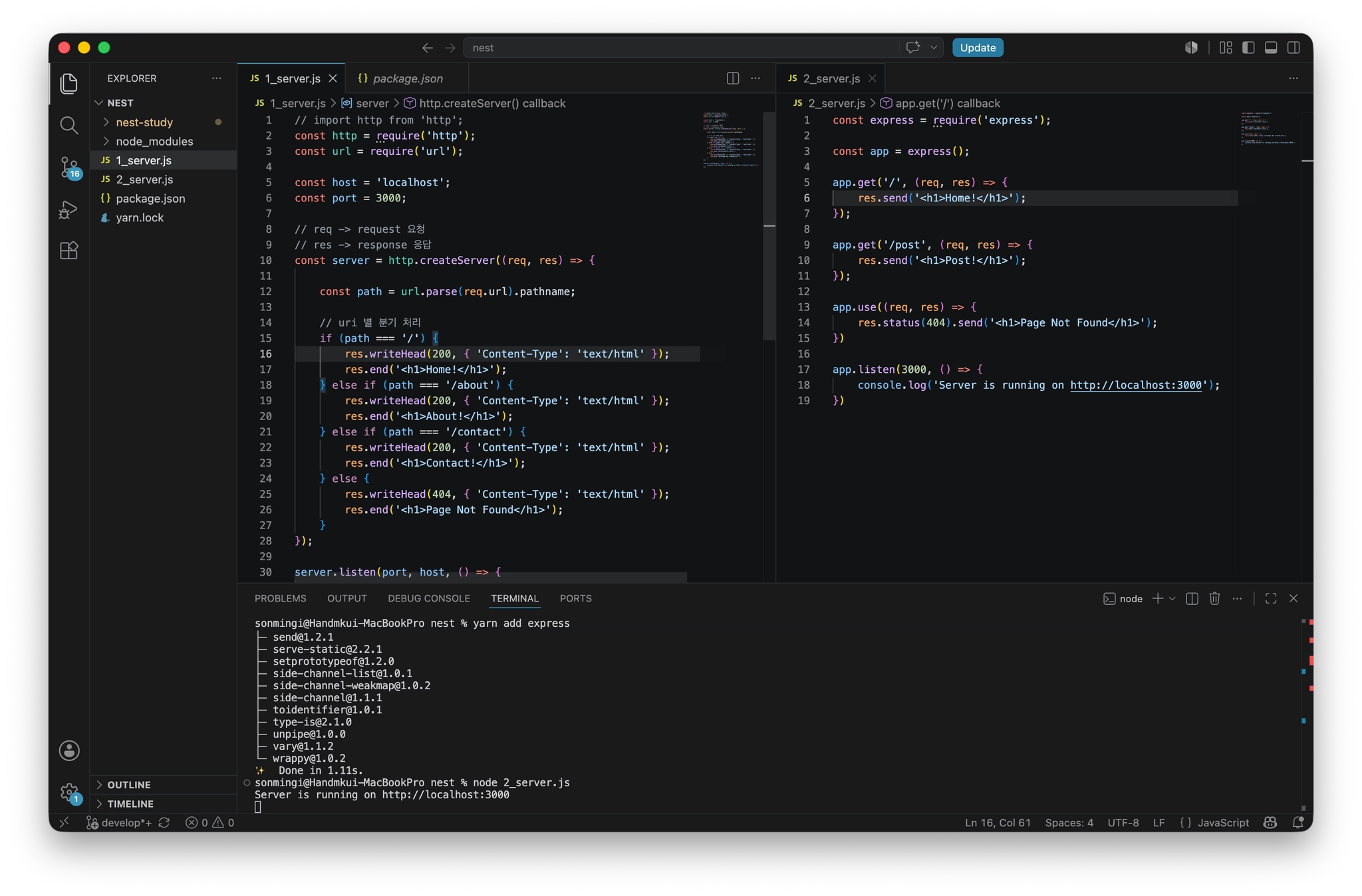
단순히 코드 라인수만 비교해도 node 로 지저분한 조건 분기처리 한것보다 훨씬 보기 편하다. 물론 이것도 꽤 익숙한 구조이긴 하나, 이를 더 쉽게 사용하기 위해 만든것이 nest 이다.
2.3. nest 로 구성
nest 공식문서에서는 프로젝트를 구성하는데에 nest-cli 를 제공한다.
https://docs.nestjs.com/first-steps
Documentation | NestJS - A progressive Node.js framework
Nest is a framework for building efficient, scalable Node.js server-side applications. It uses progressive JavaScript, is built with TypeScript and combines elements of OOP (Object Oriented Programming), FP (Functional Programming), and FRP (Functional Rea
docs.nestjs.com
npm i -g @nestjs/cli
nest new {프로젝트 명}
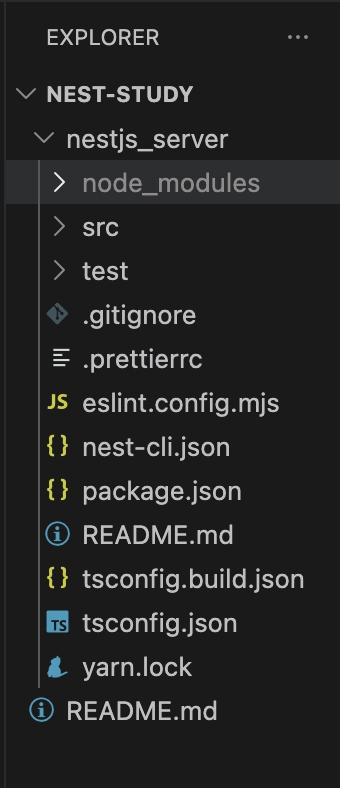
다음과 같이 nest 의 최소 구성 파일이 생성된다.
import { Controller, Get } from '@nestjs/common';
import { AppService } from './app.service';

@Controller()
export class AppController {
  constructor(private readonly appService: AppService) { }

  @Get()
  home() {
    return 'hello world';
  }

  @Get("/post")
  post() {
    return 'post';
  }
}
express 를 사용한 구성보다 좀 더 함수화된 구성을 볼 수 있다.
앞선 node - express 구성 보다 더 깔끔한 것 같다. 작성한 어플리케이션을 실행하려면 다음 명령어로 실행한다.
// dev 를 붙여야 변경사항을 감지하여 반영됨
yarn start:dev
마무리
확실히 프레임워크 없이 구성하는 것은 프레임워크의 소중함을 알게 해주는 것 같다. 그리고 공식문서가 굉장히 친절한 것 같다..ㅎ
'programming > backend' 카테고리의 다른 글
| [NEST] 1. node 와 nest 개요 (0) | 2026.08.08 |
|---|---|
| [비동기 이벤트 처리] Inotify + RabbitMQ를 활용한 실시간 파일 감지 및 비동기 처리 파이프라인 구축 (0) | 2026.01.09 |
| [Python] KoNLPy 자연어 형태소 분석 (0) | 2025.12.29 |
| [Python] SQLalchemy ORM (0) | 2025.12.24 |
| [Python] BeautifulSoup 크롤링 (0) | 2025.12.24 |